


Minimalist Wallpaper
0.00.00 Reviews
App Specs
- Version
- 1.0
- Updated On
- License
- Free
- Downloads
- 10,000+
- Developer
- ĐỖ NGỌC LINH
- Categories
- Personalization
- Platform
- Android
Screenshots
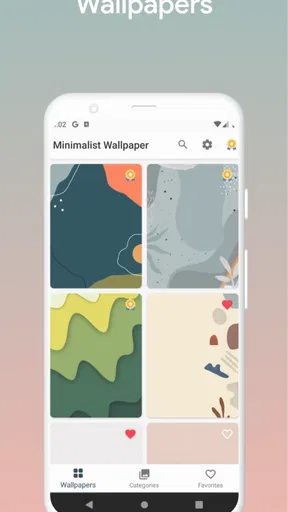
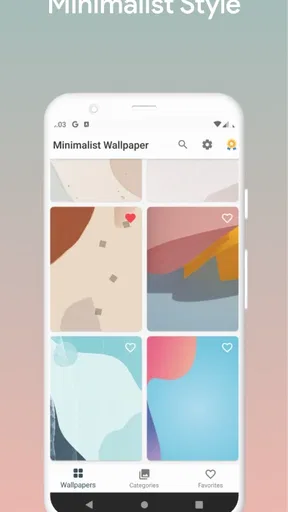
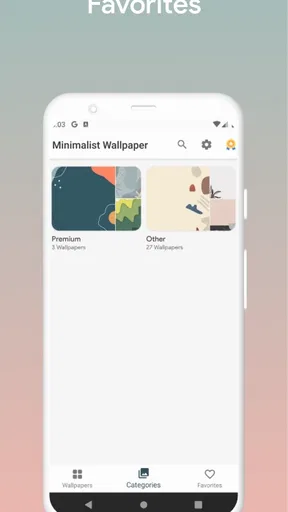
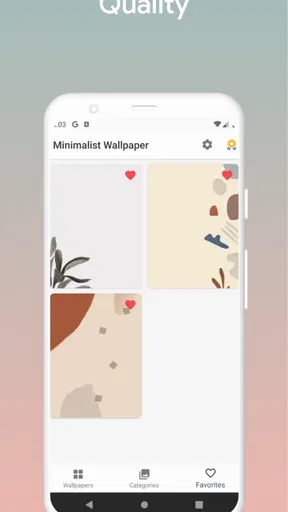
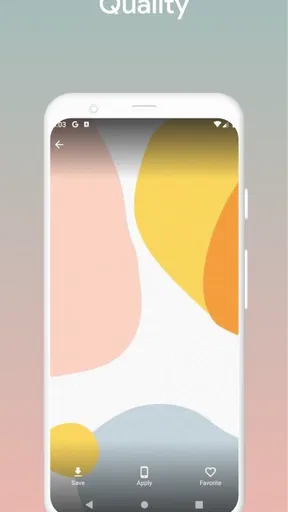
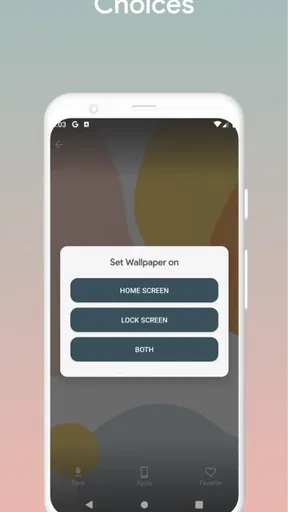
 Analysis by AppCompare
I’ve found that wallpaper apps are often judged less by their prettiest image than by what happens between choosing it and seeing it on my screen. A collection can look appealing, but browsing depends on a connection, and setting a background is only useful if the result suits the way I actually use my phone. With Minimalist Wallpaper, the appeal is the restrained visual direction: it aims to make a screen feel calmer rather than turn it into a display of competing colors and details.
A quieter choice for everyday screens
This is a personalization app from developer ĐỖ NGỌC LINH, and the idea is straightforward: choose a minimalist image to change the feel of a phone without rebuilding its entire look. That makes it a natural fit for someone who wants a less busy home screen, or who prefers a simple background behind app icons and widgets. I’d be less likely to recommend this style to someone who wants elaborate illustrations, fandom art, or extensive control over every visual detail.
The difference between a wallpaper collection and a full customization suite matters here. A dedicated launcher or theme tool can change icons, layouts, and other parts of the interface; a wallpaper app focuses on the background itself. If the wallpaper is the only thing you want to refresh, that narrower scope can be a benefit. If you want the whole phone to feel redesigned, you’ll probably need another kind of app as well.
What the connection changes
Connectivity shapes the browsing experience more than the final look of a wallpaper. When I’m choosing images in a wallpaper app, a steady connection makes it easier to explore a collection and decide what suits the screen. On a commute with patchy reception, I’d avoid leaving the choice until the last minute: browse and make a selection when the connection is reliable, then check that the background has actually been applied before putting the phone away.
That small routine is useful because a preview is not the same as a finished setup. I’d look at the image on the home screen as well as in the app: icons can cover an important detail, and a design that looks balanced in a preview may feel different behind a clock or widget. For a work phone, I’d favor a low-detail image that keeps the screen easy to scan; for a personal phone, I might choose something with a little more visual character.
Who will appreciate the minimalist approach
The app’s concept is best suited to people who like clean backgrounds and want a quick visual reset without taking on a larger customization project. It may also appeal if you share your screen often and would rather have a subdued backdrop than a highly personal photo. The trade-off is that minimalism can feel repetitive if you expect dramatic variety or want a wallpaper that tells a detailed story.
It is also worth thinking about how often you really change your background. If you enjoy revisiting wallpaper choices, a focused collection can be a pleasant browse. If you set one image and keep it for months, an app devoted to wallpapers may be more than you need; your phone’s built-in background picker may already cover that occasional task. I’d choose this app when I want a specific minimalist look, not simply because every phone needs another personalization tool.
Worth Reading Before You Choose

Flipboard Shows What News Apps Must Do Beyond the Feed

Switching to Android Auto Means Rethinking Your Driving Routine

Google Calendar Makes a Crowded Week Easier to Manage

Ludo King Makes the Most of the Minutes Between Plans

Baby Panda World Brings Quick Play to Modern Phones, but Its Game Library Feels Busy

ESPN’s Live Game View Makes Following Close Games Easier
A practical way to choose and apply
For a useful everyday test, imagine changing your background while waiting for a meeting to start. I’d first browse somewhere with dependable reception, shortlist a couple of images, and then view each one with my usual icons in place. That quick check helps avoid choosing an attractive design that makes app labels harder to read or competes with a widget I rely on. Once I settle on one, I’d confirm the change on the actual screen rather than assume the selection step completed the whole process.
There’s a simple trade-off between novelty and visual calm. A fresh image can make a familiar phone feel new, but changing it too often can undermine the consistency that makes a minimalist screen appealing. I’d save a small number of favorites rather than keep cycling through options, and use a more distinctive image on a personal device than on a phone I use for focused work. That turns wallpaper selection into a deliberate choice instead of another daily distraction.
When browsing is interrupted
If an image takes longer than expected to appear, I’d treat that first as a browsing interruption rather than repeatedly tapping through the same choice. Waiting for a stable connection and reopening the selection is a calmer approach than assuming the wallpaper has been set. After any interruption, checking the home screen is the practical recovery step: it tells me whether I need to try again and prevents a last-minute surprise when I unlock the phone later.
For travel or other low-signal situations, I’d make the visual choice before leaving rather than plan on browsing at the destination. That is a useful habit for any app where images are being explored, and it avoids confusing a slow connection with a problem in the wallpaper itself. I would not count on a particular offline workflow here; the sensible approach is to complete the part that needs browsing while reception is available.
Keeping data use intentional
Even when image browsing feels light, it is worth being selective if you are on a limited mobile plan. I’d avoid scrolling without a purpose: decide whether I want a calm abstract look, a nature-inspired scene, or a geometric pattern before opening the collection, then stop once I find an option that works. This also saves time and makes the choice more likely to fit the screen instead of being driven by endless browsing.
On a metered connection, I’d postpone exploring new images until Wi-Fi is available if data conservation matters more than changing the background immediately. I’d also check the final wallpaper at normal screen brightness before keeping it; a design that is too pale or visually busy for my everyday settings may prompt another round of browsing and another download. Choosing carefully is a small but practical way to avoid both wasted data and a background I quickly replace.
First Impressions
Opening Minimalist Wallpaper for the first time was like stepping into a gallery of simplicity. The app’s design itself is clean, easy to navigate, and doesn’t bombard you with ads, which is a big plus in my book. It’s like they knew exactly what minimalists crave—less is more!
Exploring the Collection
The app boasts a beautifully curated collection of wallpapers, each one more intriguing than the last. You can find everything from abstract shapes to serene landscapes, all with that signature minimalist touch. It’s like having an artist curate a personal gallery for your phone screen.
One of the things I loved was how the wallpapers are categorized. You can easily navigate through themes like "Nature," "Abstract," and "Geometry." It makes finding the perfect background a breeze, and let me tell you, I spent way too much time browsing!
Customization and Features
While the wallpapers themselves are the stars of the show, the app also offers some neat customization options. You can tweak colors, adjust brightness, and even blend different wallpapers together. It’s like having a mini design studio right at your fingertips.
Another feature that stood out to me was the "Daily Wallpaper" option. It’s perfect for someone like me who loves a bit of variety without the hassle of changing wallpapers manually. Every day, you get a fresh new look, keeping your home screen exciting and new.
User Experience
Using the app is a pleasure. It’s intuitive, snappy, and doesn’t lag, even on my not-so-new phone. The developers clearly put a lot of thought into making this app user-friendly. Plus, the option to save your favorite wallpapers for quick access later is a handy feature.
If you’re concerned about data usage, the app is pretty lightweight, and downloading wallpapers doesn’t eat up much bandwidth. It’s considerate of both your device storage and your data plan.
Final Thoughts
If you’re on the hunt for a way to keep your phone looking fresh without overwhelming your senses, Minimalist Wallpaper is definitely worth a try. It’s like a breath of fresh air for your device, providing a perfect balance of style and simplicity.
So, why not give your phone the makeover it deserves? With Minimalist Wallpaper, you can embrace the beauty of simplicity every time you unlock your screen. Trust me, you won’t regret it.
Availability and fit
For anyone checking compatibility before installing, the app is currently at version 1.0 and supports Android 6.0 or later. It is free to install, with in-app purchases listed from $0.29 to $19.99 per item. I’d treat that as a reason to look carefully at any optional purchase before confirming it, rather than assuming every part of the experience is included at no cost. Its age rating is Everyone, so the basic audience is broad, though the real question is whether its particular visual style matches your taste.
The app has 10K+ installs, while its average rating is 0.0. I wouldn’t use either figure as a substitute for trying the product: install totals show that people have downloaded it, but they don’t tell me whether the selection will suit my screen or whether I’ll want to keep using it. For a low-commitment personalization choice, I’d judge it by how easily I can find one wallpaper I like and how well that image works in daily use.
What to check before settling on a background
A wallpaper can be attractive on its own and still be awkward behind a real home screen. Before committing, I’d look for a quiet area where app icons and text need to remain legible, and consider whether the image’s strongest feature lands beneath a clock, search bar, or widget. This is especially useful with geometric designs: clean shapes can look striking in a preview, but a busy cluster in the wrong place may make the screen feel less minimal once the interface is layered over it.
I’d also separate the image’s mood from its practical contrast. A pale, gentle background may feel relaxing, yet it can make light interface elements harder to distinguish in some settings. A darker option may be easier on the eyes in a dim room but look too heavy in bright daylight. Checking the chosen wallpaper in the places and lighting where I actually use the phone is more reliable than deciding from a thumbnail alone.
Choosing between this and other wallpaper sources
The usual alternatives each solve a slightly different problem. A built-in wallpaper picker is convenient for a quick change and avoids installing another app, but it may not offer the same focused browsing experience. General image platforms can provide much broader variety, though searching through them takes more effort and their results may not share a consistent minimalist style. A launcher or theme package is the better route if I want icons and layout to change alongside the background.
That comparison makes this app most appealing when I want a dedicated source for understated wallpapers rather than an all-purpose design system. The narrower brief is also its main limitation: people who want frequent artistic surprises, detailed personalization controls, or a single place to reshape the whole interface may find a broader alternative more satisfying. I’d choose based on the job I want done, not on the assumption that one wallpaper app should replace every other customization option.
A realistic routine for changing screens
Picture a weekday morning: I have a few minutes before heading out and want the phone to feel less cluttered. I’d use a reliable connection to browse, pick an image with open space for my most-used icons, apply it, then check the screen once with my normal widgets visible. If it makes the clock or labels harder to read, I’d switch to a simpler composition instead of trying to force a poor fit. That short check saves the annoyance of discovering the problem during the commute.
For someone who changes wallpapers often, keeping a small shortlist is more useful than treating every browse as a fresh search. A restrained rotation can make the device feel refreshed without making the screen visually unpredictable. If I use a phone for work and personal life, I might choose a neutral option that suits both, rather than spending time switching between separate moods. The practical value is not just a good image; it is a background that stays comfortable through the routine of unlocking the phone dozens of times.
Costs, expectations, and a fair verdict
Because the app is free to download and includes optional purchases, I’d decide what I need before spending anything. For a basic wallpaper change, I would first see whether the free experience gives me a result I’m happy to keep. A purchase makes sense only if it clearly unlocks something I personally value; a small visual refresh is not worth paying for just because an option is presented. That cautious approach is especially sensible for an app whose appeal depends so strongly on individual taste.
Pros
- Simple
- clean design for easy navigation.
- High-quality image resolution for all screens.
- Regular updates with new wallpaper options.
- Low storage usage
- ideal for minimal devices.
- User-friendly interface for quick customization.
Cons
- Limited customization features available.
- No offline mode for wallpaper browsing.
- Ads can interrupt the browsing experience.
- Requires internet for full functionality.
- Lack of advanced search filters.
FAQs for Minimalist Wallpaper
What features does the Minimalist Wallpaper app offer?
The Minimalist Wallpaper app provides a wide range of high-quality, minimalist-themed wallpapers that are updated regularly. Users can browse through various categories such as abstract, nature, and geometric designs. The app also allows for easy wallpaper setting and customization, ensuring a clean and distraction-free home screen experience.
Is the Minimalist Wallpaper app free to use?
Yes, the Minimalist Wallpaper app is free to download and use. However, it includes in-app purchases and ads. Users can choose to purchase a premium version to remove ads and access exclusive wallpaper collections, ensuring a seamless experience without interruptions.
How often is the wallpaper collection updated?
The wallpaper collection within the Minimalist Wallpaper app is updated weekly. This ensures that users have access to fresh and trending minimalist designs, keeping their device's appearance up-to-date and visually appealing. Notifications are sent when new collections become available.
Does the app affect my device's performance or battery life?
The Minimalist Wallpaper app is designed to be lightweight and optimized for performance. It does not significantly impact your device's performance or battery life. The wallpapers are efficiently compressed, ensuring minimal resource usage while maintaining high quality.
Can I share wallpapers from the app with friends?
Yes, the Minimalist Wallpaper app allows users to share their favorite wallpapers with friends easily. You can directly share wallpapers via social media platforms or messaging apps. This feature makes it simple to spread the joy of minimalist design with others.


